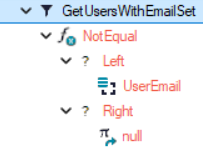
generates the following SQL query:
SELECT
[BusinessPartner].[Id] AS [Id],
[BusinessPartner].[Name] AS [Name],
[BusinessPartner].[FirstName] AS [FirstName]
FROM
[BusinessPartner] AS [BusinessPartner]
WHERE ( ([BusinessPartner].[UserEmail] <> NULL));
But the condition “.[UserEmail] <> NULL” does not work with the SQL Server and should be “IS NOT NULL”.
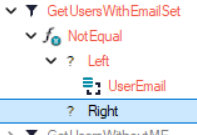
When leaving the right side of the NotEqual function empty, then it works as it generates the condition with “IS NOT NULL”:
SELECT
[BusinessPartner].[Id] AS [Id],
[BusinessPartner].[Name] AS [Name],
[BusinessPartner].[FirstName] AS [FirstName]
FROM
[BusinessPartner] AS [BusinessPartner]
WHERE ( ([BusinessPartner].[UserEmail] IS NOT NULL));
We’re not using a constant NULL to render such filters in SQL. You already figured it out by leaving the right side empty - it is also describide here.
According to this line of code I would actually expect it to work. I think I added it exactly because it is intuitive and some people could do it. Which is exactly what just happened.
And now I see why it maybe does not work, as the rightValue passed is the constant’s value, so in case of null constant it’s probably not "null”.
Which could be easily tested by creating a new string constant with value “null". @vikter can you please try?