You should prevent users to add duplicated records into the database, especially in parent and linking tables.
You can achieve it using index, appended to the database table.
##Example##
Let´s have entity ProductCathegory with a field Name. (There are names of cathegories of products stored in).
-
Create the index:
Right click on the entityProductCathegoryand Create > New Index.
In the opened form set the Name, e.g. toix_ProductCathegoryand set the IsUnique attribute toTrue.
Save it.
Now you can see created indexix_ProductCathegoryin the Model browser tree (in folderIndexes). -
Add the field:
On the indexix_ProductCathegorycreate New > Index Field.
In the form set in Field the name of column, that you want to be indexed. In this case select from list fieldName.
(Note, that the name of index changed to0_Nameafter selection of FieldName). -
Save it and deploy index to database (using Deployment Script Generator).
You should see this in the Model Browser:
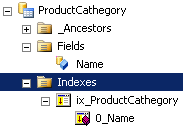
Now, if user wants enter duplicated name of product cathegory, the user interface returns message: Could not add ProductCathegory. You entered duplicate data and don´t save the record.
Using combined index for more columns in the same entity
You can use the same process for avoiding duplicated combinations of two or more columns, e.g. referenced fields in linking tables.
Let´s have entity SalesOrder with columns refProductId and refProducerId.
On the entity SalesOrder create New > Index (call it e.g. ix_SalesOrder. Don´t forget to set the attribute IsUnique to value True.
First on this newly created index create New > Index Field for the field refProductId.
Second on the same index create the second New > Index Field for the field refProducerId selected.
Save it and deploy into the database.
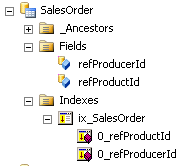
Now the applicatin prevents the user from adding duplicated combination of product and producer.