More examples of using sequential workflows
EXAMPLE 1: Workflow using parameter and updating value via XPath
This workflow works with a particular data record only – the record active in both the grid or form view in the client application. The Id of this record is passed, for example, as a parameter from the UI action that triggers this workflow.
Data type based context store
To do this we need to get the record’s Id in the load step using an UI action parameter and then store it in an extra context store based on a simple data type suitable for storing object Ids (Uniqueidentifier) instead of data structure:
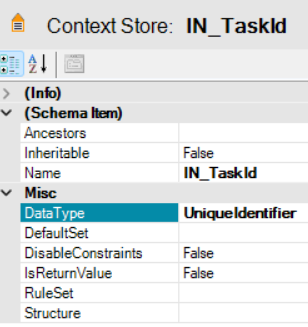
Note: The prefix “IN_” in the context store name is used for INput parameter values.
Workflow parameter
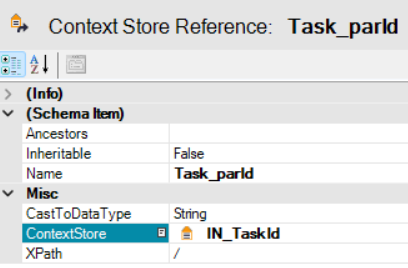
Now we need to create a new parameter (context store reference) and bind it with that context store containing the Id of the record we want to work with:
XPath based transformation
Once we have the Id stored in the parameter, we can use it to update the record data. Instead of XSL transformation we will use here a simple XPath based update that is suitable for one field value change. To do that use the (Task) Update context by Xpath task type in the transformation step:
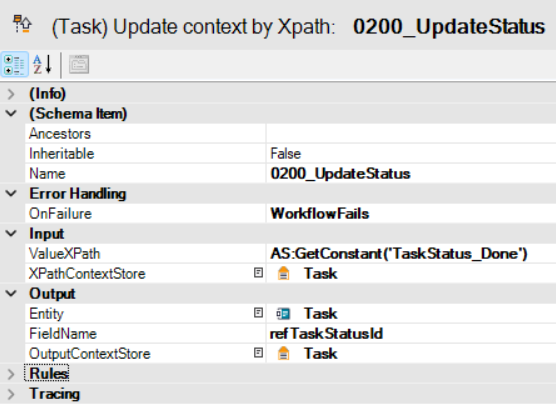
The Input value in this case will be taken from a constant using the XSLT custom function GetConstant and put to the Output – field (FieldName) and context store (OutputContextStore).
Additional settings
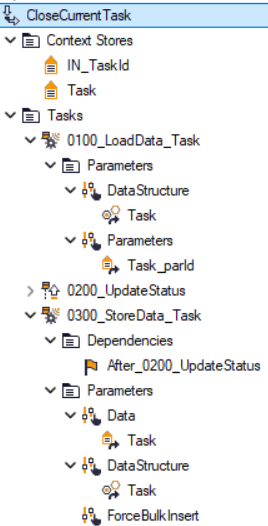
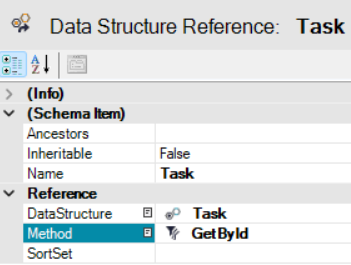
The data structure reference in the data load task (step 100_…) uses a filter set – Method (GetById) you need to create first. That filter set contains just the default filter related to the entity Id (GetId).
Workflow overview
The complete load/transform/save workflow then may look like this: