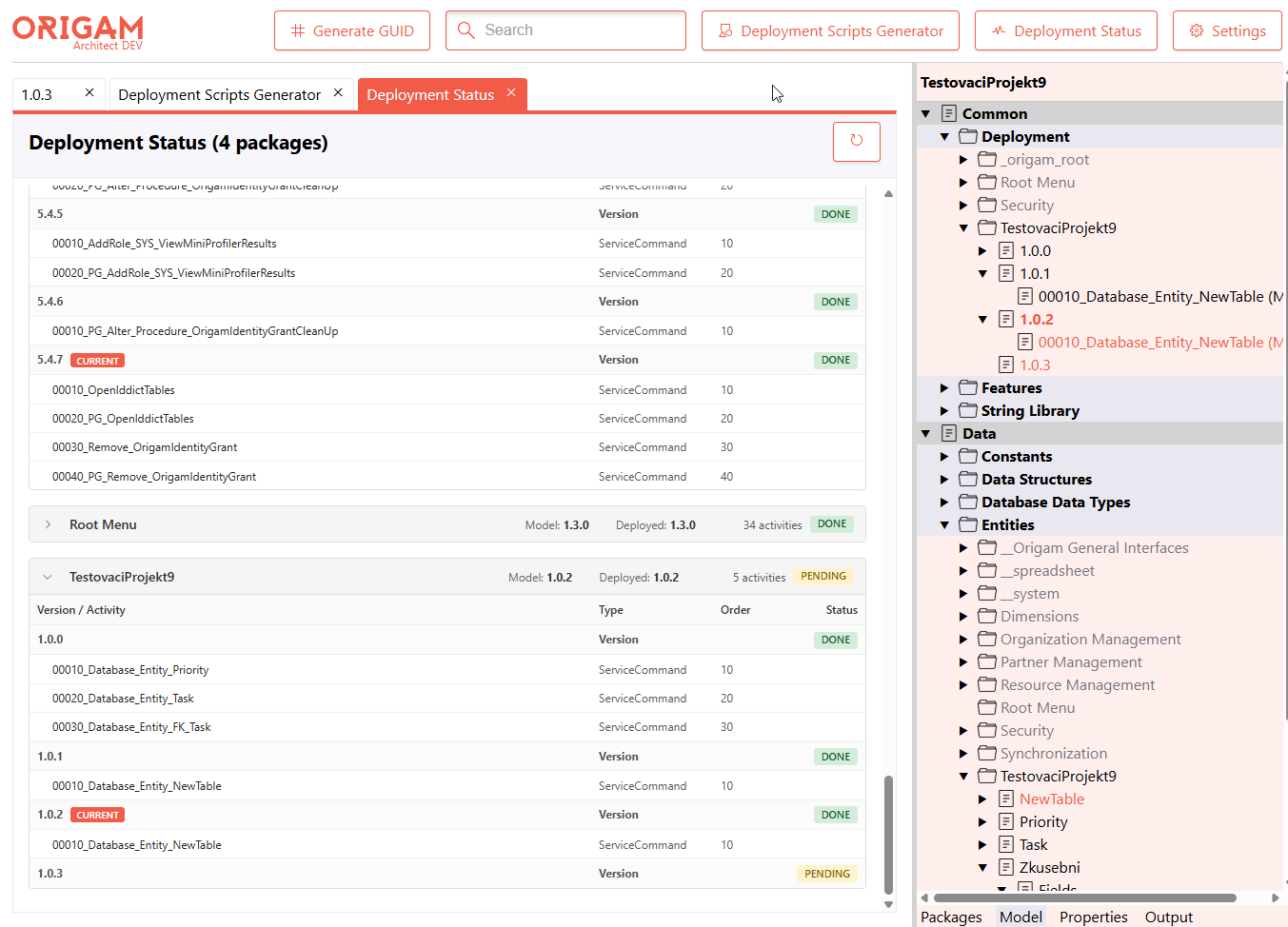
Add a new Deployment Status module to ORIGAM Architect (HTML) that gives the developer a single, read-only overview of all deployment versions and their update-script activities across the active extension and its included packages, indicating which versions/activities have already been applied to the target database and which are still pending.
Motivation
Today there is no quick way in Architect to see, per package, which deployment versions are already deployed and which are still pending — the information is scattered across the model tree and only becomes visible by drilling into individual DeploymentVersion nodes. Developers need a one-click overview before running a deployment, and a way to jump straight to a specific activity for inspection or editing.
Out of Scope
Running deployment scripts from this view (existing POST /DeploymentScripts/Run is reused only via deep-link into the activity editor).
Changing the current deployment version (already covered by POST /DeploymentScripts/SetVersionCurrent in the existing editor).
Acceptance Criteria
A Deployment Status button appears in the top bar when a package is active; clicking it opens a new tab listing every package of the active extension and its included packages.
Each package shows model version, deployed version, total activity count and pending count; Done / Pending badges accurately reflect the comparison against CurrentDeployedVersion.
Expanding a package shows all its DeploymentVersions in ascending version order, each followed by its update-script activities with type and order.
The currently selected deployment version is marked with a Current badge.
Clicking an activity row opens that activity in its own editor.
Expanded packages and the open/closed state of the module survive a browser reload.
The refresh button re-queries the backend and updates the view; switching away and back to the tab also refreshes.
One more thought that came up while working on the Deployment Status module.
Right now the Done/Pending state is inferred purely from comparing version
numbers — a deployment version counts as “done” when its number is ≤ the version
currently deployed in the database. It works, but it doesn’t reflect the actual
execution history of the individual scripts.
If we persisted each executed deployment script (migration) as a row in the
database, we could show individual activities as genuinely processed — both
here in the Deployment Status module and in the model Tree. That would be a
really nice step up: real, per-script traceability instead of a version-based
approximation.
That said, this is clearly out of scope for the current topic. It would require
a deeper change to how deployment scripts are handled — most likely a new table
to record executed scripts, plus the surrounding plumbing.
For reference, Entity Framework does exactly this: it records each applied
migration as a row in a history table (__EFMigrationsHistory), which makes it
easy to trace what ran, when, and in which order.
Not something for right now, but worth keeping in mind for the future.
I’m happy to prototype this and open a draft PR if there’s interest — or to
investigate further and come back with a concrete proposal for how such a
tracking table could look.
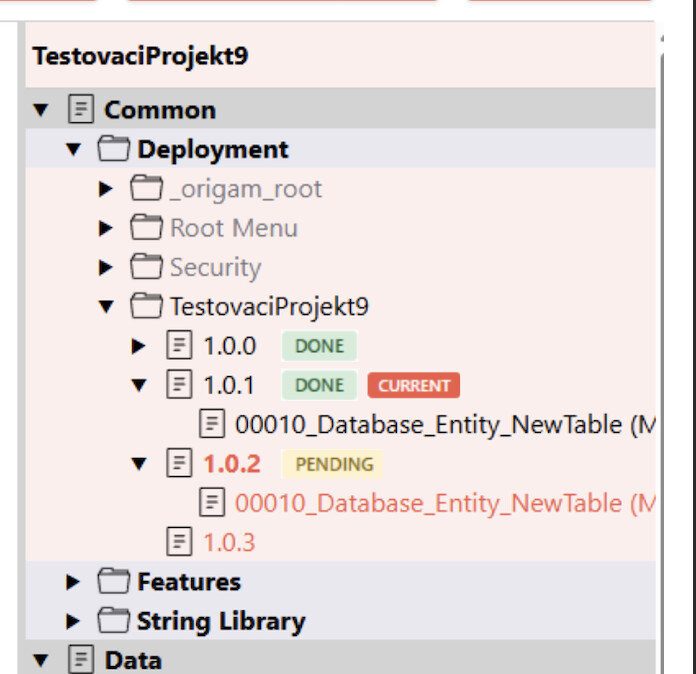
The status information is great but I think the whole UI can be simplified. We could get the same information in the tree view and that would help everyone even better because there would be no need to display additional UI.
One more thing could be valuable to see here: If the version was already pushed to Git. But that is problematic as there could be more origins theoretically. I am just leaving the note here.
I compared the branch state (a standalone “Deployment Status” screen) with the client’s request (badges directly in the model tree)
I removed the entire standalone screen - the frontend module + the TopBar button, all wiring (getEditorContainer, EditorData, EditorTabViewState, UiState persistence, API), the backend DeploymentStatusService + StatusResponseModel + the GET /DeploymentScripts/Status endpoint + DI registration, and 22 localization keys
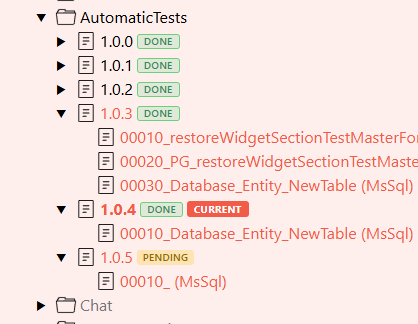
I added the status to the tree: the backend TreeNode.cs now computes DeploymentStatus (Done/Pending) only for DeploymentVersion nodes that have activities; I renamed the enum DeploymentActivityStatus → DeploymentStatus
I rendered the badges in ModelTree.tsx: DONE (green), PENDING (amber), CURRENT (orange --brand, bold) plus the styles
I polished it: added a green border to the DONE badge and shortened the badge tooltips
I fixed an IDE0005 error (redundant using System.Linq - already covered by ImplicitUsings)
Questions / clarifications I worked through
Where and when the PENDING badge shows up (version has a script + its number is higher than the deployed version); I verified the enum serializes as a string (JsonStringEnumConverter)
What Make version current actually does - it really deploys to the DB (Deploy() runs all PENDING versions up to the target)
A step-by-step guide for getting the system into a PENDING state