The required fields need to be marked—right now, it’s not clear which fields I need to fill out and which I don’t.
What
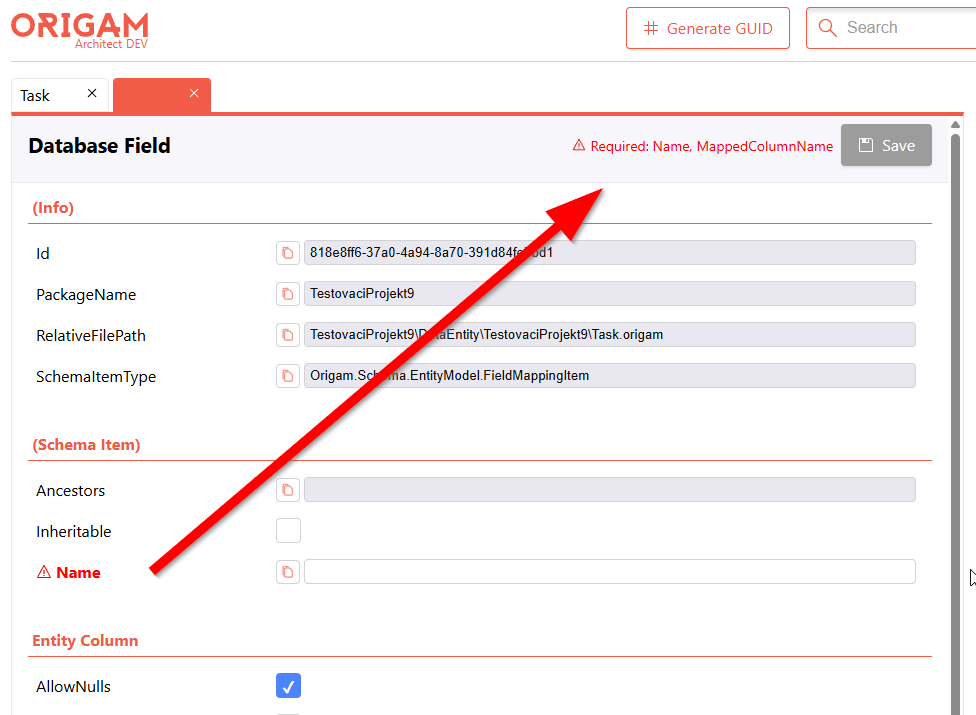
Improved the visual treatment of validation errors in the property grid editor and surfaced the reason why the Save button is disabled.
-
Property grid — required/invalid fields are now more prominent
- Property labels with a validation error are rendered in bold in addition to the existing red color.
- A red
VscWarningicon is shown next to the label. - The existing
titletooltip with the full error message is preserved.
-
Save button — list of missing/invalid fields
- When the Save button is disabled because of validation errors, a compact inline list is rendered next to it:
⚠ Required: <PropertyA>, <PropertyB>, … - Hovering the list shows a tooltip with the full per-property error messages.
- The list is only shown when Save is disabled and there are validation errors — for the regular “nothing changed yet” case the area stays empty.
- When the Save button is disabled because of validation errors, a compact inline list is rendered next to it:
Why
Previously a required/invalid field was only distinguished by a color change — easy to miss, especially on a long form. Users could also see Save being disabled without any indication of which field was blocking the save. The new presentation:
- Makes the offending field unmissable (bold + icon, not just a color shift, which is also more accessible).
- Tells the user exactly what to fix without having to scan the entire form.
Scope
This change concerns only the grid editor, but it can potentially be extended to other editors in the same way.
This topic was automatically closed 2 days after the last reply. New replies are no longer allowed.