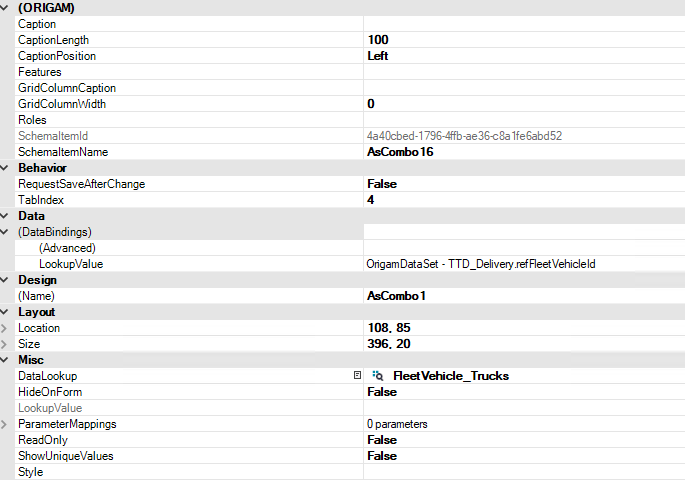
What version of Origam are you using - I’m on 2025.5.2.3862
I was trying to create Lookup with multiple fields in ValueDisplayMember. See images:
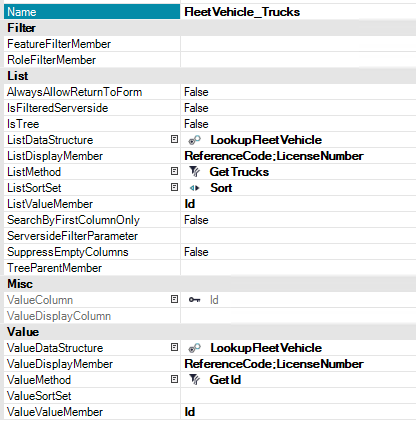
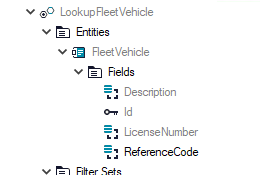
I was expecting it will work as DefaultLookup on entity field - it works as expected on Screen and I also expected it will work in Report same way - I’ve a Datastrucure with Entity, where AllFields is false and fields are added manually like this:
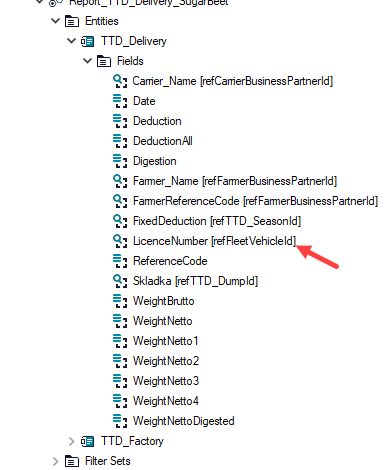
Thare is one field, which is using lookup defined above. The Datastructure field is set like this:
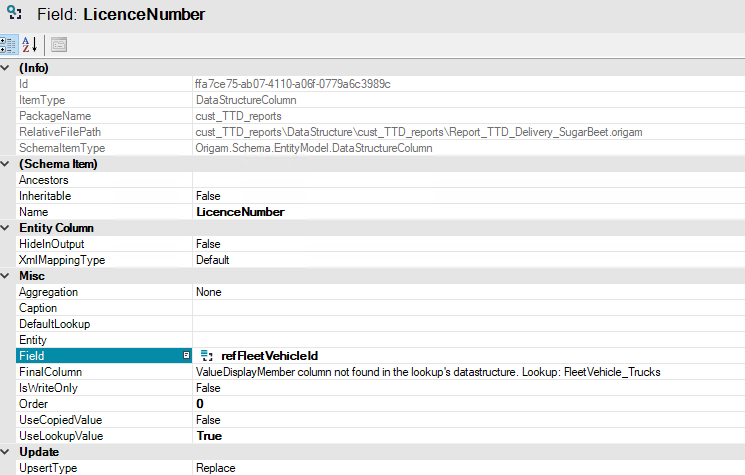
Instead I’ve got an error, the FinalColumn shows error, that field is not in the Lookup’s Datastructure.
Running the report shows similar error.
{"ClassName":"System.InvalidOperationException","Message":"ValueDisplayMember column not found in the lookup's datastructure. Lookup: FleetVehicle_Trucks","Data":null,"InnerException":null,"HelpURL":null,"StackTraceString":" at Origam.Schema.EntityModel.DataStructureColumn.get_LookedUpDisplayColumn() in D:\\a\\1\\s\\backend\\Origam.Schema.EntityModel\\Data Structure\\DataStructureColumn.cs:line 251\r\n at Origam.DA.Service.DatasetGenerator.CreateDataSet(DataStructure ds, Boolean includeCalculatedColumns, DataStructureDefaultSet defaultSet, CultureInfo culture, Boolean forceBuildFromDatastructure) in D:\\a\\1\\s\\backend\\Origam.DA.Service\\Generators\\DatasetGenerator.cs:line 338\r\n at Origam.DA.Service.AbstractSqlDataService.LoadDataSet(DataStructureQuery query, IPrincipal principal, DataSet dataset, String transactionId) in D:\\a\\1\\s\\backend\\Origam.DA.Service\\AbstractSqlDataService.cs:line 323\r\n at Origam.Workflow.DataServiceAgent.LoadData(DataStructureQuery query, DataSet data) in D:\\a\\1\\s\\backend\\Origam.Workflow\\Service Agents\\DataServiceAgent.cs:line 85\r\n at Origam.Workflow.DataServiceAgent.Run() in D:\\a\\1\\s\\backend\\Origam.Workflow\\Service Agents\\DataServiceAgent.cs:line 421\r\n at Origam.Workbench.Services.CoreServices.DataService.LoadData(Guid dataStructureId, Guid methodId, Guid defaultSetId, Guid sortSetId, String transactionId, QueryParameterCollection parameters, DataSet currentData, String entity, String columnName) in D:\\a\\1\\s\\backend\\Origam.Workbench.Services\\CoreServices\\DataService.cs:line 92\r\n at Origam.Workbench.Services.CoreServices.DataService.LoadData(Guid dataStructureId, Guid methodId, Guid defaultSetId, Guid sortSetId, String transactionId, QueryParameterCollection parameters) in D:\\a\\1\\s\\backend\\Origam.Workbench.Services\\CoreServices\\DataService.cs:line 59\r\n at Origam.BI.ReportHelper.LoadOrUseReportData(AbstractDataReport report, IXmlContainer data, Hashtable parameters, String dbTransaction) in D:\\a\\1\\s\\backend\\Origam.BI\\ReportHelper.cs:line 252\r\n at Origam.BI.CrystalReports.CrystalReportService.GetReport(Guid reportId, IXmlContainer data, String format, Hashtable parameters, String dbTransaction) in D:\\a\\1\\s\\backend\\Origam.BI.CrystalReports\\CrystalReportService.cs:line 59\r\n at Origam.Workflow.ReportServiceAgent.GetReport(Guid reportId, IXmlContainer data, String format, Hashtable parameters) in D:\\a\\1\\s\\backend\\Origam.Workflow\\Service Agents\\ReportServiceAgent.cs:line 53\r\n at Origam.Workflow.ReportServiceAgent.Run() in D:\\a\\1\\s\\backend\\Origam.Workflow\\Service Agents\\ReportServiceAgent.cs:line 103\r\n at Origam.Workbench.Services.CoreServices.ReportService.GetReport(Guid reportId, XmlDocument data, String format, Hashtable parameters, String transactionId) in D:\\a\\1\\s\\backend\\Origam.Workbench.Services\\CoreServices\\ReportService.cs:line 51\r\n at Origam.Server.Controller.ReportController.HandleReport(ReportRequest reportRequest, String reportName) in D:\\a\\1\\s\\backend\\Origam.Server\\Controller\\ReportController.cs:line 152\r\n at Origam.Server.Controller.ReportController.Get(Guid reportRequestId) in D:\\a\\1\\s\\backend\\Origam.Server\\Controller\\ReportController.cs:line 89","RemoteStackTraceString":null,"RemoteStackIndex":0,"ExceptionMethod":null,"HResult":-2146233079,"Source":"Origam.Schema.EntityModel","WatsonBuckets":null}