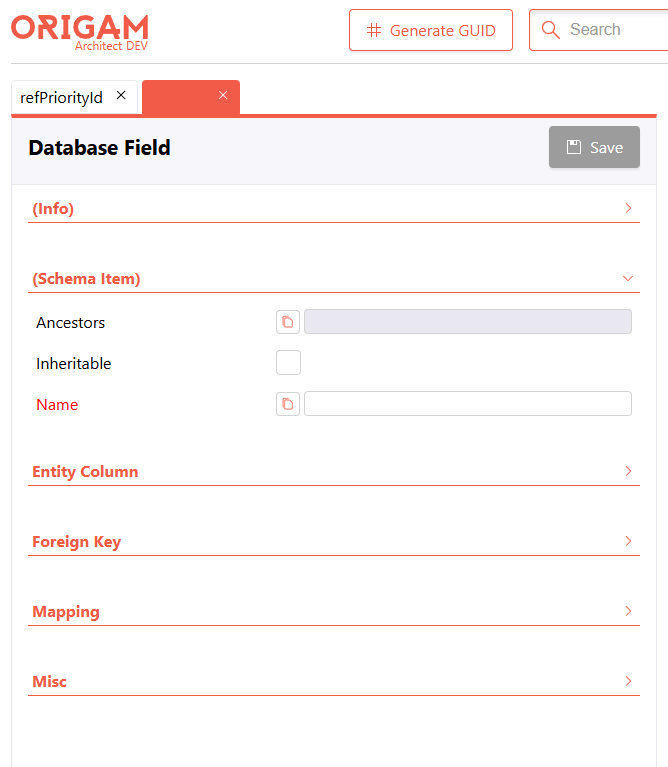
The individual sections of the property editor should be collapsible/expandable — right now everything is displayed, and the introductory “Info” section, which is usually unnecessary, cannot be collapsed
Hi everyone,
A small but long‑overdue quality‑of‑life improvement just landed in the HTML Architect property editor.
What changed
Until now every property category — Info, Layout, Misc, etc. — was always fully expanded. The Info section in particular sits at the top of the list, is rarely needed during day‑to‑day work, and was pushing useful properties off‑screen.
Each section header is now a clickable button with a chevron. Click it to collapse or expand the section.
Persistence
Your collapsed/expanded state is saved to localStorage per category name, so it survives reloads and is shared across all components you inspect (collapsing Layout once collapses it everywhere).
Defaults
Infois collapsed by default.- All other categories are expanded by default.
- If you explicitly toggle a category, your choice wins and is remembered.
How to reset
If you ever want to start over, clear the propertySectionCollapsed key in your browser’s localStorage (DevTools → Application → Local Storage).
Feedback welcome — especially if you think other categories should also be collapsed by default.
This topic was automatically closed 2 days after the last reply. New replies are no longer allowed.