The 2026.1 release introduces three new features, one upgrade and multiple fixes including two breaking changes. As there are some new tables in the database related to the Identity Server replacement you also need to update the Root and Security packages and run the deployment scripts in them.
BREAKING CHANGE: SqlClient upgraded because System.Data.SqlClient was obsolete
Updated the internal database access libraries to use Microsoft.Data.SqlClient instead of the obsolete System.Data.SqlClient. This aligns with upstream .NET deprecation of System.Data.SqlClient and ensures supported database connectivity.
After the upgrade you need to update your connection strings:
-
Add a new parameter “Encrypt” to the connection string in the Architect
(for example:Encrypt=False) -
Merge all DB connection related parameters into one connection string in the Docker configuration (.env) file
(for example:OrigamSettings__DataConnectionString="Encrypt=False;Data Source=localhost,1433;Initial Catalog=mydatabase;User ID=sa;Password=mypassword")
This is related to MSSQL only, PostgreSQL is not affected. More on the configuration is here.
BREAKING CHANGE: Identity Server replaced with Open Iddict
If you run ORIGAM Server in Docker, you can skip this as the changes are implemented through the configuration of the Docker container, as described in the previous point.
We replaced the IdentityServer4 authentication server implementation with Open Iddict across the product. IdentityServer4 was no longer maintained so we have moved to other stack.
Before upgrading you need to update your Appsettings.json file. The important change is that IdentityServerConfig section was renamed to OpenIddictConfig and there are also some updates in this configuration block as described here.
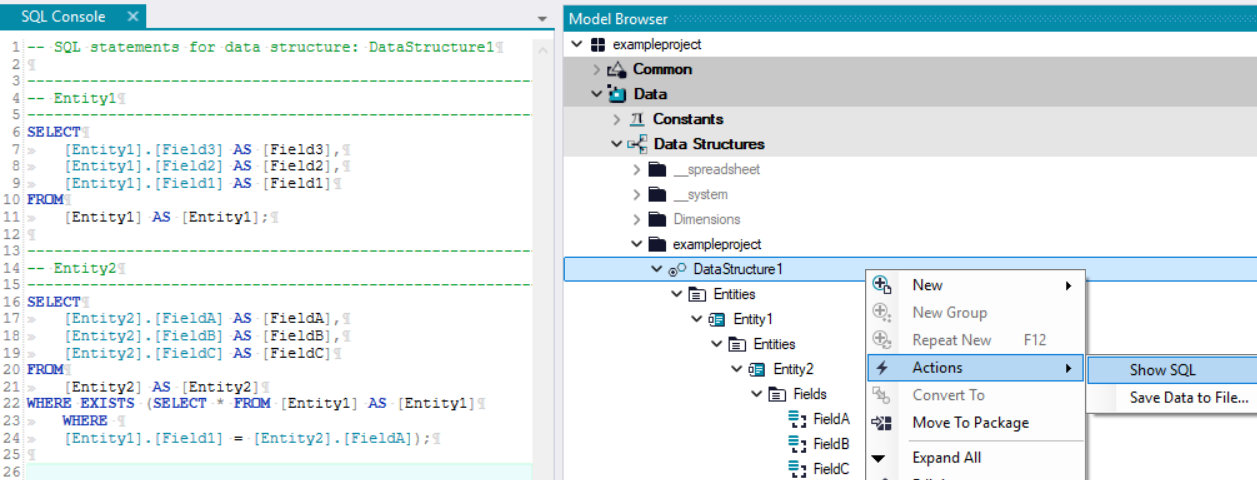
FEATURE: Add ‘Show SQL’ command for a data structure
We added the ability to run the “Show SQL” action for an entire Data Structure. Previously this was only possible on individual entities or via a filter, but now the system lists all SQL commands for the whole structure directly.
FEATURE: XSLT combine path
Added a new XSLT utility to help construct file paths in transformations. The function inserts the correct path separator for the current platform and provides logic for combining path segments, making XSLT-based file path handling model-independent. Function documentation is here.
FIX: MiniProfiler - Missing quotes around GUIDS
Corrected an issue where GUID parameters in Mini Profiler SQL output were missing surrounding quotes. This fix ensures GUID values are correctly quoted in the profiler’s SQL display, aligning with expected formatting and improving readability.
FIX: MiniProfiler - Modelled APIs are not profiled
Fixed an issue where MiniProfiler did not collect profiling data for modeled API endpoints. After this change requests to APIs are now included in the profiler results.
FIX: MiniProfiler - Rules and Transformation not profiled
Fixed an issue where MiniProfiler did not collect profiling data for rule execution and transformation processing. After this change the profiler is correctly injected and timings for rules and transformations are included in profiling results.
FIX: Start process wasn’t reflecting timeout value
Fixed an issue where the OperatingSystemService.StartProcess call ignored the configured timeout parameter and did not stop the external process as expected. After this change the timeout setting is respected and processes started via the service will be terminated (workflow step fails) when the timeout expires.
FIX: Password not hidden in the reset password screen
Fixed an issue where the password text was not hidden in the password reset screen opened from the password reset link (/Account/ResetPassword).
FIX: Slashes were sometimes changed to backslash in metadata files paths
Resolved an issue where slashes were sometimes replaced by backslashes in metadata .origam workflow file paths, ensuring consistent and correct path separators.
FIX: Error when opening a screen with radio buttons
Fixed an issue in Architect where opening older screens containing radio button controls caused an error about setting the Boolean value to AsRadioButton.Value. The error no longer appears when loading those screens.
FIX: Repeat workflow button could be pressed multiple times
Fixed an issue where the Repeat button in the workflow result screen could be clicked multiple times, which could start multiple workflow executions. The button is now handled to prevent repeated triggering.
FIX: Screen could be closed before initialization finished
Resolved an issue where a screen tab could be closed while an eagerly loaded screen was still initializing. In such case the data loading continued in the background, which could lead to repeated openings and unnecessary server load.
FIX: Session expired error shown when closing screen before load finished
Fixed an issue where the message “Your connection expired or the application has been restarted” could appear if a user closed a screen before its data finished loading. The message is now only shown in cases where the session actually expires or the server restarts.