The 2026.7 release adds a built-in PDF generator that works on every platform, faster logins, and API usage tracking. The HTML Architect gets deployment status in the model tree and a second batch of action wizards, along with several fixes.
Version: 2026.7.0.4337
Released on: 2026-08-13T22:00:00Z
Origam
New features
Built-in PDF generator (#4414)
Origam can now render PDF reports on its own, without Crystal Reports, Fast Reports, or SQL Server Reporting Services. The new report processor uses Apache FOP, which formats XSL-FO markup into PDF, so reports work on both Windows and Linux. Reports are defined in XSLT, with no graphical designer.
Requires an additional origam/xsl-fo-server container. Configure its URL with XSLFO_RENDERER_URL (default http://xslfo:8080) and timeouts with XSLFO_RENDERER_TIMEOUT_SECONDS (default 60). See built-in PDF generator.
API request tracking (#4654)
User activity tracking now covers API requests, recording who made the call, when, and to which URL, plus the HTTP method and number of returned rows for data pages. This extends the existing tracking of user events and exports.
The tracking is enabled per project through the EVENT_API_REQUEST feature, the same way as the other event tracking features. Events are stored in the existing user tracking table.
Faster login (#4634)
Login could take 10+ seconds because password verification became more expensive over time. The new SHA-256 based hasher checks passwords in well under a second. Existing password hashes keep working and are rehashed to the new format on the next successful login, so no action is needed.
Bug fixes
- A modeled API endpoint returned HTTP 200 when the caller was missing the required role. It now returns 403, or 401 when not logged in (#4624)
- Workflows no longer send an unnecessary redirect when no redirect action matches the completed workflow (#4632)
- Index names in the database respect the project naming convention instead of prefixing the owning entity’s name (#4681)
HTML Architect
New features
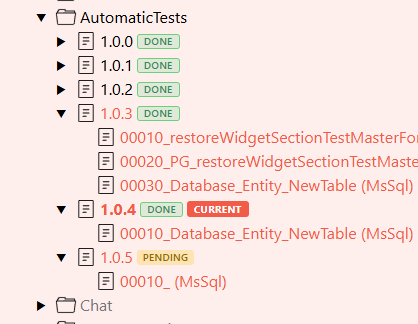
Deployment status in the model tree (#4415)
Each deployment version under the Deployment node now shows a status badge, so you can see what is deployed without opening a separate screen:
- DONE (green): the version is already deployed to the database
- PENDING (amber): the version is not deployed yet
- CURRENT (orange): the version new deployment scripts are added to
Badges appear only on versions that contain deployment scripts.
More action wizards (#4616)
The second batch of the most-used Desktop Architect wizards is now available in the HTML Architect:
- Create Role from Page
- Create Screen and Create Screen Section
- Create Localization Child Entity
- Create Data Structure
- Create Menu Item from Workflow
Bug fixes
- Creating a new deployment version no longer throws HTTP 500 on invalid input. Version numbers, duplicates, and changing the current version’s number are now validated up front (#4490). Validation accepts version numbers with at least two parts, so plain
x.xis allowed (#4683) - The property editor no longer shows values left over from the previously selected widget (#4539)
- Context menu no longer renders off-screen at small window sizes
Chat
Bug fixes
- Chat windows were blank after an editor dependency upgrade. The incompatible dependency version is pinned back, and the upgrade is guarded so it cannot regress (#4605)
Deployment
Improve installation procedure (#4612)
- New
server-directcontainer mode starts the server without Nginx or sudo, for platforms such as Azure Container Apps - Composer no longer requires creating the initial administrator; registration happens through the built-in self-registration endpoint. The task stays available for automated setups
- The root model is now bundled with the Composer image instead of downloaded from GitHub
- Composer generates an
origam-project.jsonmanifest with non-secret project information (root package id, project name) for later scripts
Frontend plugins
Breaking change
Observable state in plugin classes (#4544)
The HTML client upgraded from MobX 5 to MobX 6 and from React 17 to React 19. Plugin classes that declare observable state with @observable, @computed, or @action need a change, otherwise those members are plain properties: reads and writes are not tracked and the plugin no longer updates when they change.
MobX 6 requires makeObservable(this) in the constructor of every class that declares observable members. A call in a base class does not cover the members a subclass adds, so each plugin class needs its own call:
export default class MyPlugin extends AbstractScreenPlugin {
  @observable myValue = "";

  constructor() {
    super();
    makeObservable(this);
  }
}
This applies to classes extending AbstractScreenPlugin or AbstractSectionPlugin and to classes implementing IScreenPlugin or ISectionPlugin directly. The abstract base classes already call makeObservable for their own members.
React 19 removed the global JSX namespace. Plugin code that uses the JSX.Element type needs to import it: import { JSX } from "react".