The 2026.8 release adds scheduled processing for work queue entries and an OpenAPI description of the modeled API with a Swagger UI. The HTML Architect gets folder management in the model tree, along with fixes for screens with disabled action buttons and for the editor’s Vim mode.
Version: 2026.8.0.4358
Released on: 2026-09-05T22:00:00Z
Origam
New features
Scheduled work queue entry processing (#4748)
Work queue entries can carry a ScheduledTime field. When it is set, the standard work queue processor holds the entry until the scheduled time. Entries without it are processed as soon as possible, as before. The scheduling does not use the Scheduler.
To enable it for a queue, add the ScheduledTime field to the WorkQueueStructure referenced by the WorkQueueClass behind the queue. See scheduled work queue entry processing.
OpenAPI description of the modeled API (#4623)
The server can generate an OpenAPI description of the modeled API, including custom controllers, and serve it at /openapi/api.json. A Swagger UI for browsing and trying the endpoints is available at /api-docs. The authentication scheme shown in the document follows the server’s configuration.
The feature is disabled by default. Set UserApiOptions:OpenApiDocumentationEnabled to true in appsettings to turn it on. The documentation is served without authentication, so enable it only on servers where that is acceptable. See tool for automatic documentation of modelled API.
Bug fixes
- Screens with disabled action buttons failed to open with the error “The root section with the root entity can’t have action buttons disabled.” when the screen section used a SortSet. The check introduced in 2026.3.0 has been withdrawn in this release and the screens open again as before (#4765). It also fixes Field from used SortSet not exist on Screen Section panel error. Disabling action buttons on the root section of a lazily loaded screen still prevents the screen from displaying (original report).
HTML Architect
New features
Folder management in the model tree (#4499)
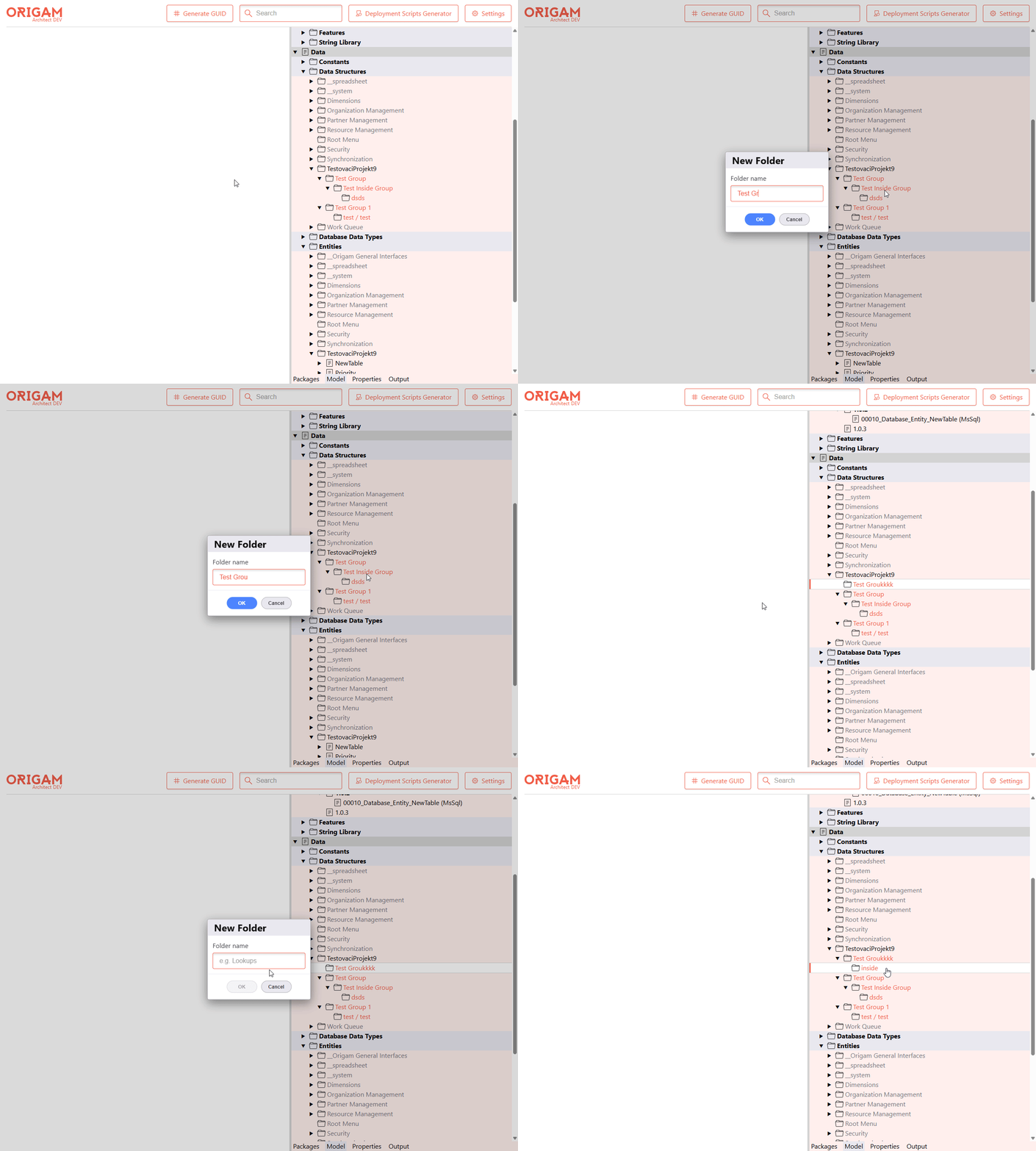
You can create, rename, and delete folders (model item groups) in the model tree: right-click a provider node such as Data Structures, or an existing folder, and pick New Folder. Folder names are validated in the dialog (empty, invalid characters, duplicates at the same level), and deleting a folder asks for confirmation because it removes everything inside. See Folder creation and Folder rename + remove.
Bug fixes
- Vim mode in the code editor, such as the transformation editor, was broken. Vim key bindings apply again and the status bar is visible (#4722)
Frontend plugins
The MobX 6 upgrade from 2026.7 is in this release as well. Plugin classes that declare observable state with @observable, @computed, or @action need makeObservable(this) in their constructors; see Frontend plugins in the 2026.7 release notes.