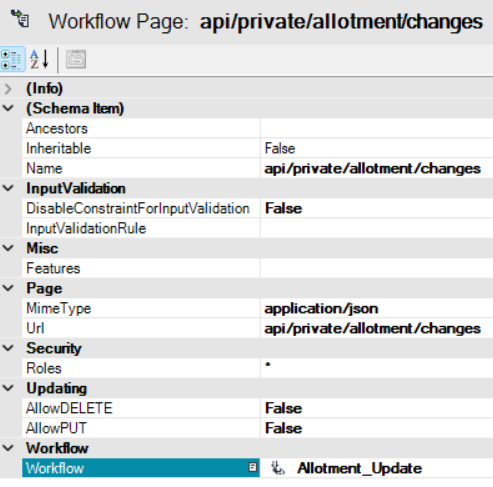
This article demonstrates how to create a simple RESTful API that makes your data accessible to external applications and services or to internal custom frontend plugins.
There are four different API types – in ORIGAM called “API Pages” – this text focuses solely on one of these types – the Data Page, which provides data in XML or JSON format.
Note: The API in the model is only used to expose the API of the modeled application externally; work with any external APIs is modeled in the business logic section using sequential workflows.
[!success]- Prerequisites for proceeding
To follow along, you must meet the following prerequisites:
We will perform the following actions:
- Provide an entire list of items
- Provide the details of a specific item from the list
- Update an existing item
- Delete an item
As an example, we will use the simple task manager from the initial tutorial. We will provide all existing task records in our API and then work with one of them.
Introduction
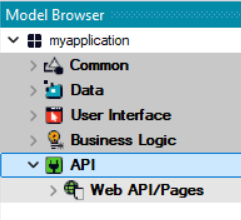
The API section is one of the five main ORIGAM modeling areas:
API methods
ORIGAM works with both REST and SOAP APIs and currently supports the following HTTP methods:
- GET
- POST
- PUT
- DELETE
The purpose of the GET and DELETE methods is clear, so it is important to understand the difference between POST and PUT. Generally speaking, the primary purpose of POST is to create a new record, while the primary purpose of PUT is to update an existing record. By the way, there is also the PATCH method, which is primarily used to partially update a record, but we won’t be covering that here.
ORIGAM uses only the PUT method, which either updates an existing record or creates one if it does not yet exist. In addition, PUT and DELETE are essentially part of GET – on the data page, you can enable or disable the use of PUT and DELETE, or keep only the basic GET function if you set both of these options (AllowDELETE and AllowPUT) to False.
API options
ORIGAM API supports both JSON and XML formats; in this example, we will use only JSON. In terms of structure, the data in the API is based on a data structure.
There are two API privacy options: private or public. Any API starting with api/public is preset as public, for other URLs the accessibility as public or restricted routes can be declared in the UserApiOptions section of the appsettings.json file. In other words, anything not located in api/public/ is considered private by default, unless explicitly set otherwise.
In this tutorial, we will create a public API — accessible to anyone once published, but limited by the server accessibility, during development typically the localhost.
API Data page
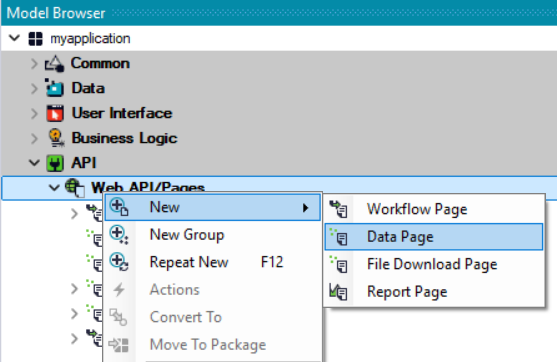
In all cases, we will create a new Data page designed to expose application data:
API parameters
When working with APIs, you will usually also need to filter records using parameters in the URL — for example, to specify a particular record using its Id, or to select records only within a certain time range (date from — date to). This is done using parameters that need to be defined within the API.
You can learn more about other API Page types in the documentation.
Getting ready to create an API
Data structure
Any API data page requires a Data Structure to operate. Before creating the API data page, we’ll first create one. You can name it the same as the main database entity with _API suffix.
If you plan to include multiple different APIs in your application, it may be clearer to place all the API related data structures into a separate group (subfolder), similar to how it’s done for Lookups.
Filtering
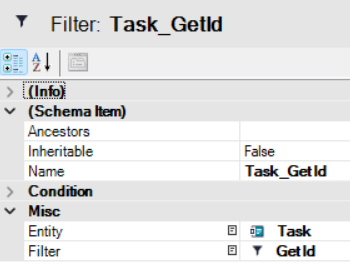
When working with a specific record, we will also need a Filter Set with a Filter that retrieves data based on a provided Id:
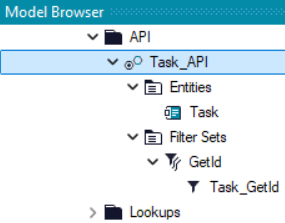
Now we are ready to create an API that provides data based on that Data Structure and its Filter Set:
Get the entire list of items
To retrieve a list of all records from the desired entity — in this case Tasks — we need to create a new API Data Page and configure the following attributes in it:
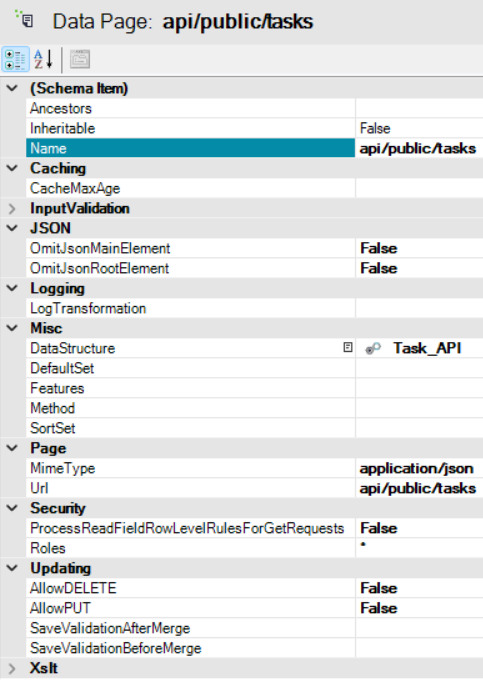
This Data Page is based on our Data Structure, the result will be in JSON format and will be available to all users regardless of their user role. For the development purposes it will be accessible at the URL https://localhost/api/public/tasks
Since AllowDELETE and AllowPUT are set to False, this endpoint will only allow data retrieval.
For example, suppose the application contains these three tasks:

When we call the new API at https://localhost/api/public/tasks, we receive the following JSON data:
{
  "ROOT": {
    "Task": [
      {
        "Status_Id": "376ae614-1381-4ff5-b894-9c96c7978ead",
        "Name": "Create accounts",
        "AssignedTo_Id": "21c7c5cd-b373-43a6-aa40-aed4533686c2",
        "DueDate": "2025-11-30T00:00:00+01:00",
        "Priority_Id": "bae03329-491c-4b09-8345-f8d26f027e9b",
        "NotificationSent": false,
        "Description": "Create user accounts for all new users who joined this month",
        "Selected": false,
        "RecordCreated": "2025-02-18T13:56:18.073+01:00",
        "RecordUpdatedBy": "21c7c5cd-b373-43a6-aa40-aed4533686c2",
        "Id": "5784a17e-15fe-4f1e-b612-6a35055f4c0c",
        "RecordCreatedBy": "21c7c5cd-b373-43a6-aa40-aed4533686c2",
        "RecordUpdated": "2025-11-06T10:10:30.447+01:00"
      },
      {
        "Status_Id": "376ae614-1381-4ff5-b894-9c96c7978ead",
        "Name": "Create new roles",
        "AssignedTo_Id": "21c7c5cd-b373-43a6-aa40-aed4533686c2",
        "DueDate": "2025-11-25T00:00:00+01:00",
        "Priority_Id": "70a0e603-144e-4e90-b83b-4cd9b78e1469",
        "NotificationSent": false,
        "Description": "Create two new roles",
        "Selected": false,
        "RecordCreated": "2025-03-10T12:46:34.463+01:00",
        "RecordUpdatedBy": "21c7c5cd-b373-43a6-aa40-aed4533686c2",
        "Id": "e5bdc0ae-15e9-44ed-8162-45239657d47c",
        "RecordCreatedBy": "21c7c5cd-b373-43a6-aa40-aed4533686c2",
        "RecordUpdated": "2025-11-06T10:10:48.71+01:00"
      },
      {
        "Status_Id": "376ae614-1381-4ff5-b894-9c96c7978ead",
        "Name": "Deactivate accounts",
        "AssignedTo_Id": "21c7c5cd-b373-43a6-aa40-aed4533686c2",
        "DueDate": "2025-12-31T00:00:00+01:00",
        "Priority_Id": "298928a8-cef3-4060-9fa0-f21b0509631c",
        "NotificationSent": false,
        "Description": "Deactivate all unused accounts",
        "Selected": false,
        "RecordCreated": "2025-07-28T10:29:06.64+02:00",
        "RecordUpdatedBy": "21c7c5cd-b373-43a6-aa40-aed4533686c2",
        "Id": "50c49bfd-8e05-42b1-adb4-b7cc4ff9f9da",
        "RecordCreatedBy": "21c7c5cd-b373-43a6-aa40-aed4533686c2",
        "RecordUpdated": "2025-11-06T10:10:58.197+01:00"
      }
    ]
  }
}
Since the AllFields property is set to True in the data structure we’re using, our API returns all fields of the record, including metadata such as RecordCreated, etc. If we want to limit this, we set AllFields to False and select only the fields we’re interested in.
Get the details of a specific item from the list
To target a specific record, you better create a new API Data Page this time with {id} in the name. You can also use the existing API created in the previous step, define a filter based on the Id, and ignore it if the Id is empty — that is, display all existing Ids. However, having a separate API for record details is a clearer solution.
Parameter mapping
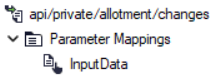
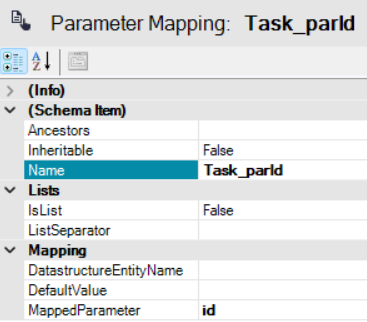
To select a specific record by its Id, you need to use a parameter. You define this parameter via Parameter Mappings on the relevant API data page:
Filtering
Next you need to configure the Data Structure Filter Set – Method – that retrieves the record’s data based on its Id. Your Data Page configuration may look like this:
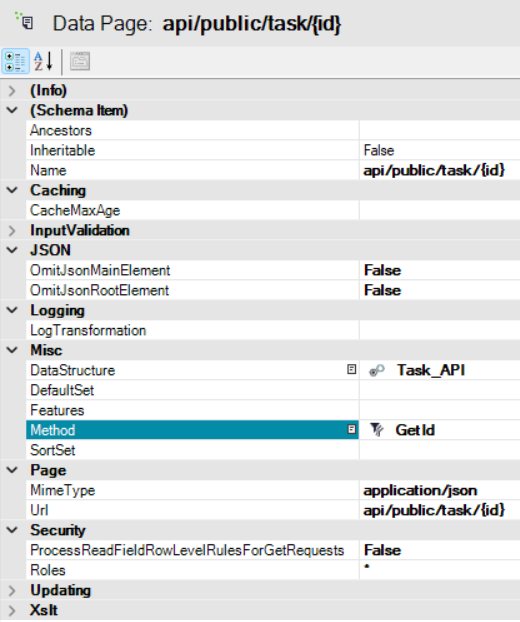
The URL might look like this:
https://localhost/api/public/task/5784a17e-15fe-4f1e-b612-6a35055f4c0c
This request will return the details (based on your Data Structure) of that record:
{
  "ROOT": {
    "Task": [
      {
        "Status_Id": "376ae614-1381-4ff5-b894-9c96c7978ead",
        "Name": "Create accounts",
        "AssignedTo_Id": "21c7c5cd-b373-43a6-aa40-aed4533686c2",
        "DueDate": "2025-11-30T00:00:00+01:00",
        "Priority_Id": "bae03329-491c-4b09-8345-f8d26f027e9b",
        "NotificationSent": false,
        "Description": "Create user accounts for all new users who joined this month",
        "Selected": false,
        "RecordCreated": "2025-02-18T13:56:18.073+01:00",
        "RecordUpdatedBy": "21c7c5cd-b373-43a6-aa40-aed4533686c2",
        "Id": "5784a17e-15fe-4f1e-b612-6a35055f4c0c",
        "RecordCreatedBy": "21c7c5cd-b373-43a6-aa40-aed4533686c2",
        "RecordUpdated": "2025-11-06T10:10:30.447+01:00"
      }
    ]
  }
}
Create or update an existing record
If you want to create a new record, you need the data for it. If you want to modify an existing record, in addition to this data, you also need its Id. In our case, the Id is passed as an URL parameter and the record data in the body of the HTTP request.
To allow record creation or updating through your API, enable this functionality in the Data Page settings by setting AllowPUT to True:
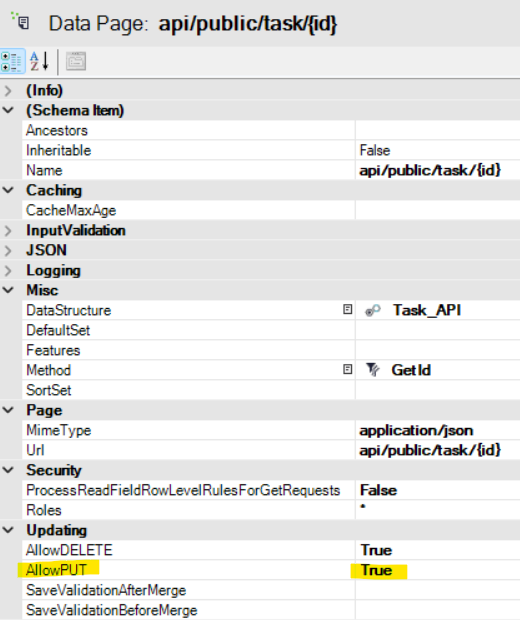
When a PUT request is sent, there are two possible scenarios:
A record with the specified Id
- already exists — it will be updated,
- does not exist — it will be created.
In both cases, it is necessary to do the following:
- Include the Id in the request URL, e.g.:
PUT https://localhost/api/public/task/5784a17e-15fe-4f1e-b612-6a35055f4c0c - Create a separate parameter for the request body in your model:
- Include the complete record structure in the request body — exactly as returned by the GET command, including all brackets and
"ROOT", for example:
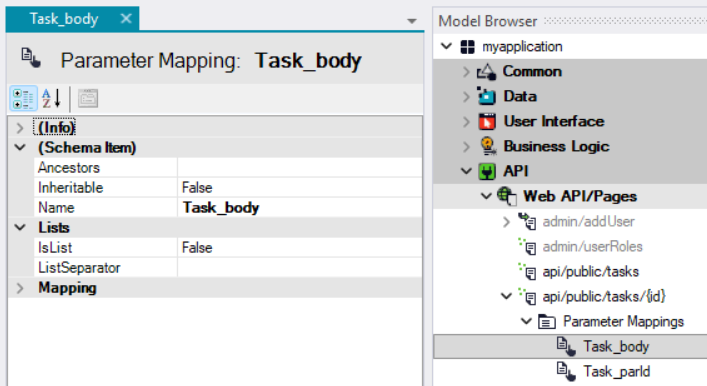
{
  "ROOT": {
    "Task": [
      {
        "Status_Id": "376ae614-1381-4ff5-b894-9c96c7978ead",
        "Name": "Create accounts",
        "AssignedTo_Id": "21c7c5cd-b373-43a6-aa40-aed4533686c2",
        "DueDate": "2025-11-30T00:00:00+01:00",
        "Priority_Id": "bae03329-491c-4b09-8345-f8d26f027e9b",
        "NotificationSent": false,
        "Description": "Create user accounts for all new users who joined this month",
        "Selected": false,
        "RecordCreated": "2025-02-18T13:56:18.073+01:00",
        "RecordUpdatedBy": "21c7c5cd-b373-43a6-aa40-aed4533686c2",
        "Id": "5784a17e-15fe-4f1e-b612-6a35055f4c0c",
        "RecordCreatedBy": "21c7c5cd-b373-43a6-aa40-aed4533686c2",
        "RecordUpdated": "2025-11-06T10:10:30.447+01:00"
      }
    ]
  }
}
nullor lost. Therefore, if you intend to update only specific fields (similar to a PATCH request), you must still provide the full record data and modify only the fields you wish to change.
Delete a record
To enable record deletion via the API, set AllowDELETE to True in your API configuration.
When a DELETE request with a valid Id is sent, the corresponding record will be deleted.
For example, this request:
DELETE https://localhost/api/public/task/5784a17e-15fe-4f1e-b612-6a35055f4c0c
will delete the record with that Id, if it exists. No request body is required.
Other API types
In addition to the content above, several other types of APIs are listed below: