This article demonstrates how to create and use different types of rules in ORIGAM.
[!success]- Prerequisites for proceeding
To follow along, you must meet the following prerequisites:
As an example, we will use the task manager from the initial tutorial.
Introduction
There are several different types of rules in the ORIGAM platform. These rules are primarily used for:
- Calculating values
- Validating values
- Evaluating whether conditions are fulfilled
- Activating and deactivating elements in the user interface
Rules are mainly used for the following model elements:
- Workflows
- Data structures
- Row-level security — determining under which conditions are data on the level of individual rows visible or can be changed
They are also sometimes used for:
- Screen references in the menu — Rule set or Selection dialog
- API — validation of input data for the PUT method
- UI — visibility of action buttons, confirmation before executing an action
Rules work either with XPath, which returns a single value using a simple formula, or with a condition that is evaluated as true or false. However, they can also work with the entire data structure (the XML tree) and use more complex XSL transformations (XSLT).
Rules can be used not only to check data, calculate values, and evaluate conditions, but also to change data. In some cases, other approaches can be used to calculate values (for example XSLT or custom functions). However, if you want to perform automatic calculations during UI data entry, you need to use a rule. Similarly, if you want to reuse the same formula across multiple transformations, using a rule is recommended.
Overall, ORIGAM works with the following types of rules:
-
Simple data rule
XPath-based rule used for enforcing rules on data (calculated fields) -
Condition rule
XPath-based rule that always returns a boolean value (True/False) -
Validation rule
XSLT-based rule that returns an error or a warning when defined conditions are met -
Entity rule
XPath-based rule used for evaluating entity-level conditions -
Complex data rule
XSLT-based rule used for enforcing rules on data (multiple calculated fields at once) -
Validation rule lookup XPath
XPath function that returns a string containing a Validation Rule
The documentation also mentions another type of rule, namely the Data structure rule. Technically speaking, this is a Simple data rule or a Complex cata rule that is a part of the Data structure Rule set.
Simple data rule
A Simple data rule is similar to a formula in a spreadsheet — it calculates a value based on other values, usually fields. Simple data rule is always used in a Data structure Rule set.
For example: total price = quantity * unit price. Technically, this formula is based on XPath and its result is typically a single numeric value.
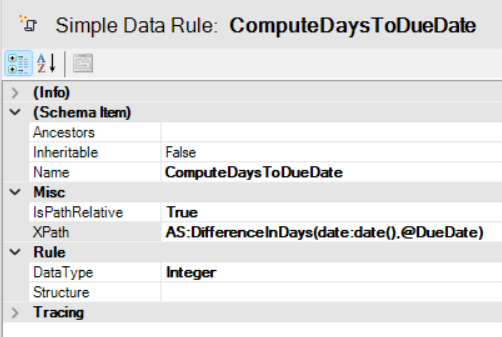
Another example is shown below. This rule calculates how many days remain until a task is due, counting from today:
Notes:
IsPathRelativemeans that you can use a path starting from the current XML node and do not need to start withROOTXPathcontains the formula written in valid XPath; in this case, ORIGAM’s custom functionAS:DifferenceInDaysis usedDataTypeis set to Integer, as the function returns a whole number; the data type has to be of the same type as the field that is filled with the calculation
Using the rule in a Data Structure Rule Set:
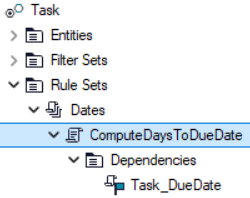
Dependencies is list of fields which on change trigger the execution of the rule, in this case change of the field DueDate in the Task entity (Task_DueDate).
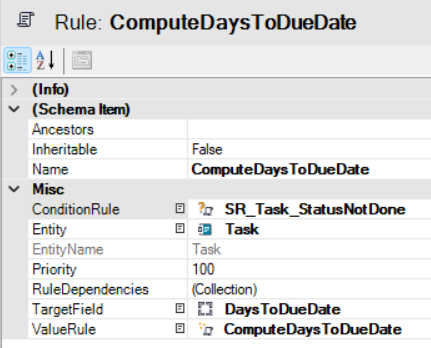
Notes:
ConditionRulespecifies the condition under which this rule will be applied (see the next chapter)Entitylinks the rule to a data entityTargetFielddetermines the entity field that will be filled with the rule result — in this case, the number of remaining days; here we use a virtual field that is not saved to the databaseValueRuleis simply a reference to the rule definition
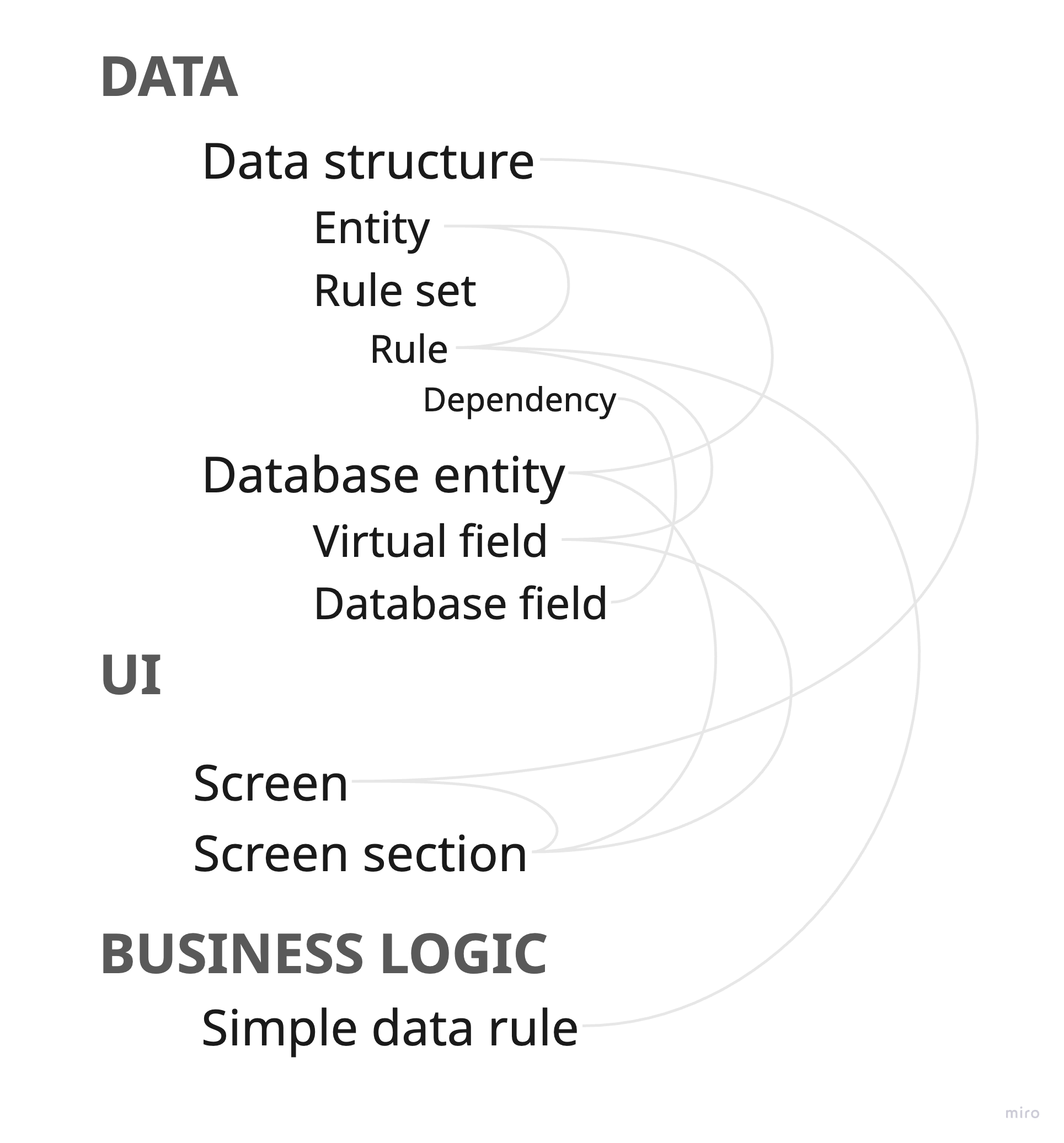
Here is a simple schema of all the model elements used:
Using this rule and the corresponding data structure, we can, for example, add a column named “Days to Due Date” to the Task data view:
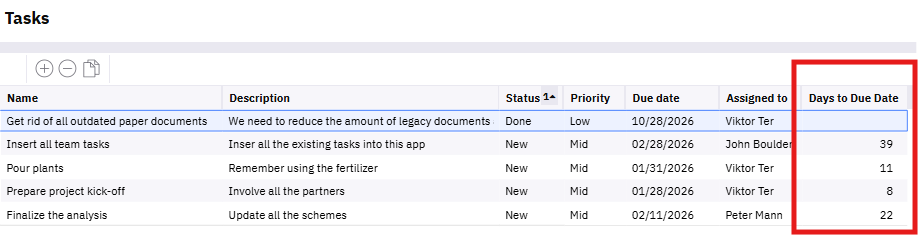
Note: In this case, the value appears only after the Due Date is changed. If you want it to be calculated every time the form is displayed, you should instead use a function call field added to your virtual or database entity.
Condition Rule
A Condition Rule is also an XPath-based formula, but it always returns a boolean value — true or false. It is used in Workflows, Data structures and API data pages to evaluate whether a step should be executed, an element should be visible or a redirect can happen.
In the previous chapter, you can see that the Simple data rule ComputeDaysToDueDate, used in the Task entity, has an associated Condition rule that determines whether the rule should be applied.
In this specific case, the rule states that the remaining days should be calculated only when the task is not completed — in other words, when its status does not equal “Done”:
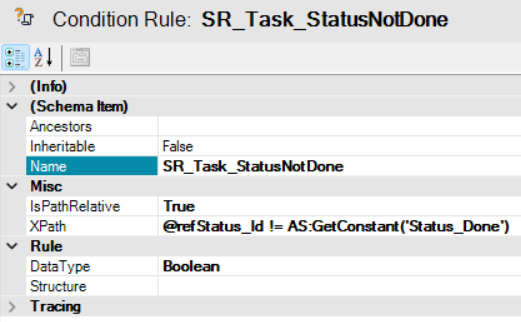
Notes:
- Name starts with prefix
SR_which means Start Rule IsPathRelativeis set to True, as the current node is used- The
XPathformula compares the value of therefStatus_Idattribute with the ID of the “Done” status - The custom function
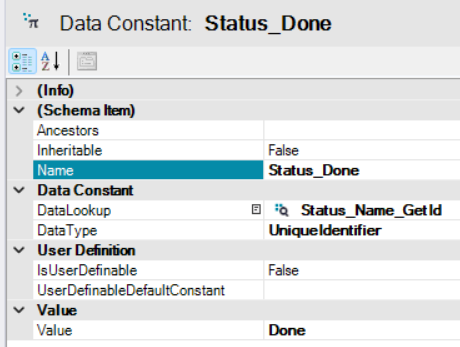
AS:GetConstantreferences a constant defined in the model under Data / Constants:
DataTypeis set to Boolean, as the result indicates whether the condition is fulfilled
Validation Rule
A Validation Rule is used to validate conditions and is implemented as an XSL transformation (XSLT). It returns a list of issues found, if any exist, or an empty data collection otherwise. The list of errors is returned in the RuleExceptionDataCollection XML structure.
This type of rule only checks for errors and returns them; it does not modify any data.
An example validation rule with comments is shown below. This XSLT acts purely as a validator: it processes all SD nodes under ROOT, checks whether the mandatory @g1 field is present and non-empty, and generates an error record if the condition is not met.
<?xml version="1.0" encoding="UTF-8"?>
<xsl:stylesheet xmlns:xsl="http://www.w3.org/1999/XSL/Transform" version="1.0"
	xmlns:AS="http://schema.advantages.cz/AsapFunctions"
	xmlns:date="http://exslt.org/dates-and-times" exclude-result-prefixes="AS date">

	<!-- Calls another existing transformation -->
	<xsl:include href="model://e1c65fcd-118d-4eb3-9c2f-aa27fec132ba"/>

	<xsl:template match="ROOT">
		<!-- Calls a template that processes and displays the error message  -->
		<RuleExceptionDataCollection xmlns:xsd="http://www.w3.org/2001/XMLSchema" xmlns:xsi="http://www.w3.org/2001/XMLSchema-instance">
			<!-- Applies the template below to all SD nodes -->
			<xsl:apply-templates select="SD"/>
		</RuleExceptionDataCollection>
	</xsl:template>

	<xsl:template match="SD">
		<!-- Condition checking if the field g1 is empty -->
		<xsl:if test="not(string(@g1))">
			<!-- For empty fields the error template is called and all specified parameters filled in  -->
			<xsl:call-template name="Exception">
				<xsl:with-param name="FieldName"><xsl:value-of select="'g1'"/></xsl:with-param>
				<xsl:with-param name="EntityName"><xsl:value-of select="'SD'"/></xsl:with-param>
				<xsl:with-param name="Message">
					<xsl:value-of select="'No responsible person selected'"/>
				</xsl:with-param>
				<xsl:with-param name="Severity"><xsl:value-of select="'High'"/></xsl:with-param>
			</xsl:call-template>
		</xsl:if>
	</xsl:template>

</xsl:stylesheet>
Notes:
- The included template on line 7 is a system rule located in the Root package under
Business Logic / Rules / _common / ER_ExceptionTemplate; it defines the fields of rule exceptions (entity, field, message, severity, etc.) - In ORIGAM,
Severity = Highcauses the server to throw an error and stop the execution, whileSeverity = Lowresults in a warning and allows processing to continue SDis a predefined virtual Database entity (located under_system) with fields of all possible types and is used for temporary data storage, for example, in sequential workflows
When relating to the Task Manager, if we replace the entity and field name in the example above, we could be validating that a newly created high-priority task has a responsible person assigned before the screen is saved.
Additional examples can be found in any ORIGAM project, for example in the Security package ValidateNewUser, which checks that all mandatory fields for a new user are filled.
Entity Rule
An Entity rule is essentially a Simple data rule (XPath-based) bound to a specific entity and used to evaluate entity-level conditions. Its input context is /row, for example /row/@EntityFieldName, representing the currently active record in the UI.
This type of rule can be used for UI actions (action buttons), row-level security, row coloring, and similar purposes, and it is configured for a specific entity element.
As an example, consider the entity rule BusinessPartner_hasUsername defined for the system entity Business Partner. It can be found in the Security package and simply verifies that the UserName field is filled:
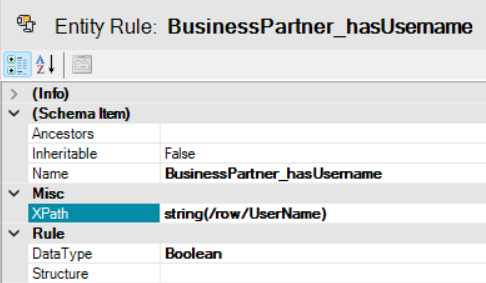
In this case, the rule is used, for example, to determine whether the action button for removing a user should be visible.
Complex Data Rule
A Complex data rule is an XSL transformation (XSLT) that can modify multiple fields at once. It can be thought of as a collection of Simple data rules that calculate multiple values based on the XML document in a single operation.
This rule is bound to an entire data structure, and therefore the TargetField attribute is not used:
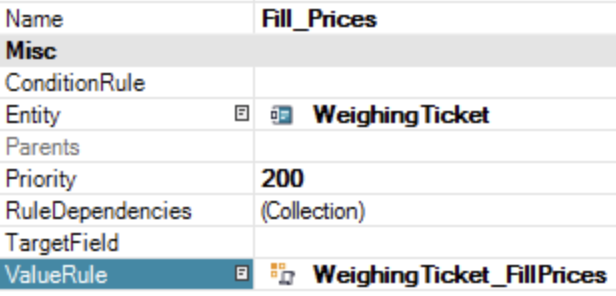
Example use case:
When a user selects a different product or price list on the screen, multiple prices are recalculated — base price, discounted price, VAT, and so on. A single change thus triggers recalculation of several derived values.
<?xml version="1.0" encoding="UTF-8"?>
<xsl:stylesheet xmlns:xsl="http://www.w3.org/1999/XSL/Transform" version="1.0"
	xmlns:AS="http://schema.advantages.cz/AsapFunctions"
	xmlns:date="http://exslt.org/dates-and-times" exclude-result-prefixes="AS date">

	<xsl:template match="ROOT">
		<ROOT>
			<xsl:apply-templates select="WeighingTicket"/>
		</ROOT>
	</xsl:template>

	<xsl:template match="WeighingTicket">
		<xsl:copy>
			<xsl:copy-of select="@*"/>
			<xsl:if test="@refProductId and @refPriceListId">
				<xsl:variable name="unitPrice">
					<xsl:value-of select="AS:LookupValue('7fcbcedd-3617-45fd-bf2a-ca09858e6987',
					'PriceListItem_parValidFrom', AS:isnull(@Date, date:date-time()),
					'PriceListItem_parProductId', @refProductId)"/>
				</xsl:variable>
				<xsl:variable name="customerUnitPrice">
					<xsl:if test="AS:LookupValue('1abeb240-2f10-42b3-b37d-896c0d072f48',
					'PriceListItem_parValidFrom', AS:isnull(@Date, date:date-time()),
					'PriceListItem_parPriceListId', @refPriceListId,
					'PriceListItem_parProductId', @refProductId)">
						<xsl:value-of select="AS:LookupValue('1abeb240-2f10-42b3-b37d-896c0d072f48',
						'PriceListItem_parValidFrom', AS:isnull(@Date, date:date-time()),
						'PriceListItem_parPriceListId',@refPriceListId,
						'PriceListItem_parProductId',@refProductId)"/>
					</xsl:if>
				</xsl:variable>
				<xsl:variable name="discount">
					<xsl:if test="AS:LookupValue('11fea74b-149e-4ed8-a281-1b004352fd68',
					'PriceListItem_parValidFrom', AS:isnull(@Date, date:date-time()),
					'PriceListItem_parPriceListId', @refPriceListId,
					'PriceListItem_parProductId', @refProductId)">
						<xsl:value-of select="AS:LookupValue('11fea74b-149e-4ed8-a281-1b004352fd68',
						'PriceListItem_parValidFrom', AS:isnull(@Date, date:date-time()),
						'PriceListItem_parPriceListId', @refPriceListId,
						'PriceListItem_parProductId', @refProductId)"/>
					</xsl:if>
				</xsl:variable>

				<xsl:attribute name="UnitPrice">
					<xsl:value-of select="$unitPrice"/>
				</xsl:attribute>
				<xsl:attribute name="CustomerUnitPrice">
					<xsl:if test="$customerUnitPrice">
						<xsl:value-of select="$customerUnitPrice"/>
					</xsl:if>
				</xsl:attribute>
				<xsl:attribute name="Discount">
					<xsl:if test="$unitPrice">
						<xsl:value-of select="$discount"/>
					</xsl:if>
				</xsl:attribute>
				<xsl:attribute name="DiscountedUnitPrice">
					<xsl:if test="$discount > 0.01">
						<xsl:value-of select="AS:Minus($unitPrice,AS:Mul($unitPrice,AS:Div($discount,100.0)))"/>
					</xsl:if>
				</xsl:attribute>
			</xsl:if>
			<xsl:copy-of select="*"/>
		</xsl:copy>
	</xsl:template>
</xsl:stylesheet>
Validation Rule Lookup XPath
The Validation rule lookup XPath represents a special use case. It provides a validation rule formula stored in the database to be used by another rule. In other words, it is a rule that determines which other rule should be applied.
Consider the following scenario to clarify its purpose:
A supplier defines custom customer categories with specific restrictions — for example, small customers are not allowed to place orders exceeding $10,000. To avoid constant remodeling, a memo field is used to assign an XSLT-based rule to each category. A lookup based on the current category retrieves the appropriate rule and evaluates it.
All such rules are stored in the database, and a lookup based on a given value returns the correct rule. The purpose of this special rule is therefore to return another rule that is then executed.
Rule Tracing
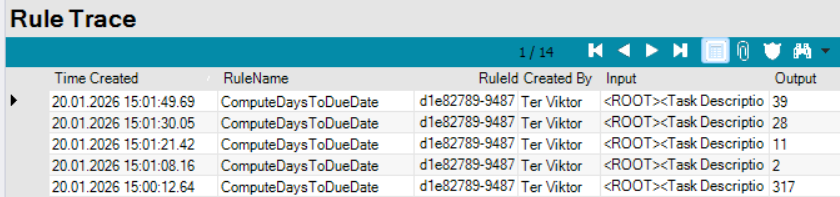
If any of your rules does not work as expected, you can use the Rule Trace tool to identify the cause. To do so, open the main menu in the Architect and select Tools / Show Rule Trace.
This is an example of what you may see:
Notes:
Input— contains the complete XML data used by the rule
More rule examples
More examples of various rules can be found in the post below this text.